Google Search has a feature called "Have AI check pricing." A customer searches for a service, answers a few questions, and Google's AI phones several local businesses to ask about prices and availability, then sends the customer a summary. It only calls businesses that already show up in local results, so a complete Google Business Profile, clear pricing, and a phone that is always answered decide whether you win the job.
What changed
In July 2025, Google started rolling out a feature in Search that phones local businesses for the customer. Someone searches for a service such as "pet groomers near me," and a new option appears: Have AI check pricing. They answer a few questions about what they need and when, and Google's AI calls several businesses to ask about prices and availability. A few minutes later, the customer gets one summary comparing the answers.
At Google's developer conference on May 19, 2026, Google confirmed the feature for more categories, including home repair, beauty, and pet care. For plumbers, roofers, cleaners, salons, and groomers, the first "customer" to call may now be Google itself.
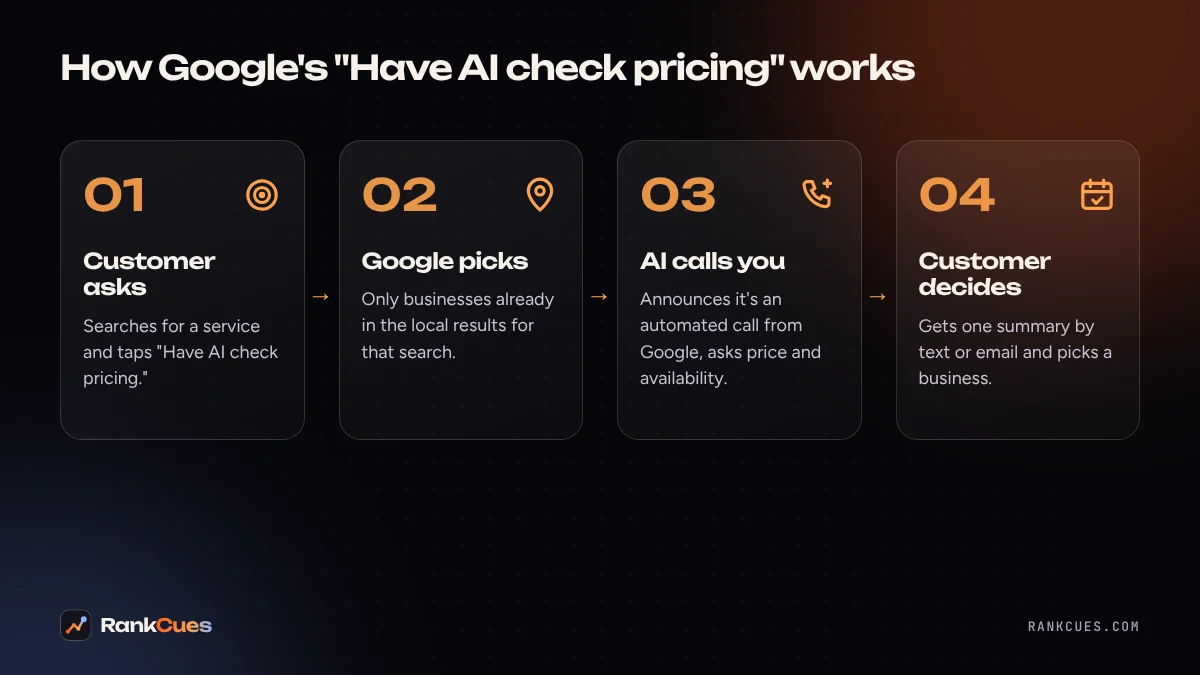
How a Google AI call works
- The customer asks. They search for a service and tap "Have AI check pricing."
- Google picks the businesses. It only calls businesses that already appear in the local results for that search and match the customer's location, service, and timing.
- The AI calls. The call starts by announcing that it is an automated system calling from Google on behalf of a customer. Calls are monitored and recorded.
- The customer gets a summary. Google collects the answers and sends the options to the customer by text or email.
Why this matters for your business
Three things decide whether this feature brings you jobs or sends them to a competitor.
You have to be in the pool. Google only calls businesses that already show up in local results. If your Google Business Profile is thin, has the wrong category, or doesn't list the service, you are never called. The customer never learns you exist.
Someone, or something, has to answer. A missed call or a full voicemail box means no quote in the summary. Your competitor's answer is the only one the customer sees.
Your answer is written down. Whatever your team says about price and availability goes into a written comparison. "I'd have to check with the boss" looks weak next to a business that gives a clear range and a time slot.
Your five-step action plan
- Complete your Google Business Profile. List every service you offer in plain words, set your service area, keep hours accurate (including holidays), and use the most specific primary category. This is what puts you in the pool of businesses Google calls.
- Write down your price ranges. Agree on honest ranges for your 5 to 10 most common jobs, plus what changes the price ("drain cleaning from $150 to $350 depending on access"). Give the list to everyone who answers the phone.
- Answer every call. If you can't staff the phone all day, use call forwarding to a backup, a missed-call text-back, or an AI receptionist that can quote your approved ranges and book a time.
- Make booking easy. Offer a clear next step: a time slot, a booking link, or a callback window. Availability is part of what Google reports back.
- Decide on opting out carefully. Google's support page explains that businesses can opt out of automated calls. Opting out stops the calls, but it also takes you out of the comparison.
The bigger picture
This is part of a wider shift: search engines are starting to act for customers, not just show them links. The businesses that win are the ones machines can read and reach: accurate profiles, clear prices, and a phone that always picks up. If you'd like a second pair of eyes, our free business audit checks your Google Business Profile and how your business shows up in AI search.
Sources
- TechCrunch: Google rolls out AI-powered business-calling feature (July 16, 2025)
- PYMNTS: Google adds AI-powered local business calling to Search
- Retail Insider: When the first customer to call your business is an AI assistant (August 2026)
Frequently asked questions
Does Google tell my staff that the caller is an AI?
Yes. Google has said every call starts by announcing that it is an automated system calling from Google on behalf of a customer.
Can my business opt out of Google's AI calls?
Yes. Google's support page says businesses that don't want automated calls from Search can opt out. Before you do, remember that opting out removes you from those comparisons.
Which businesses does Google's AI call?
Only businesses that already appear in local search results for the customer's search and match what they asked for, such as location, service, and timing.
What should we say when Google's AI asks about price?
Give an honest range for your common services and explain what changes the price. A clear range is better than refusing to answer, because your answer goes straight into the summary the customer reads.
Keep reading
- Google's official guide to AI search, explained for local businesses
- Google Business Profile changes in 2026: a checklist for local businesses
- AI receptionist vs answering service vs hiring staff: 2026 cost comparison
- What your Google Business Profile categories actually do
- Helping AI assistants describe your business accurately
- Five follow-up automations every service business can set up