Google Business Home is a closed beta that puts your Business Profile, Google Ads, YouTube channel and Merchant Center account in one dashboard, with AI tools built on Gemini. Google's help page says it's invite-only for select business categories in the U.S. and U.K., for verified profiles with fewer than 10 locations. You can't buy your way in; keep your profile accurate and watch for an invite email.
How many Google logins does your business have? For a lot of local owners it's three or four: one for the Business Profile, one for Google Ads, one for the YouTube channel a nephew set up in 2019, and maybe a Merchant Center account nobody remembers creating.
Google is testing a fix for that. It's called Google Business Home, and it's a beta dashboard that pulls those tools into one place with AI built in. Most owners can't use it yet. But it tells you where Google is taking small business tools, and the prep work pays off either way.
What is Google Business Home?
Google's Business Home help page calls it "a growth partner built with Gemini models that connects your essential business tools." In plain English: one dashboard that sits on top of your Business Profile, Google Ads, YouTube and Merchant Center (Google's product listing tool for stores).
Here's a simple way to picture it. Right now your Google presence is like four filing cabinets in four different rooms. Business Home moves them into one office and adds an assistant who reads every folder and leaves a note on your desk saying what to do next. The cabinets don't change. The assistant only knows what's in the folders.
Search Engine Roundtable first reported it on October 22, 2026. Barry Schwartz wrote that Google had been rolling it out slowly over the past couple of months and that he got an email granting him access.
What can you do in Business Home?
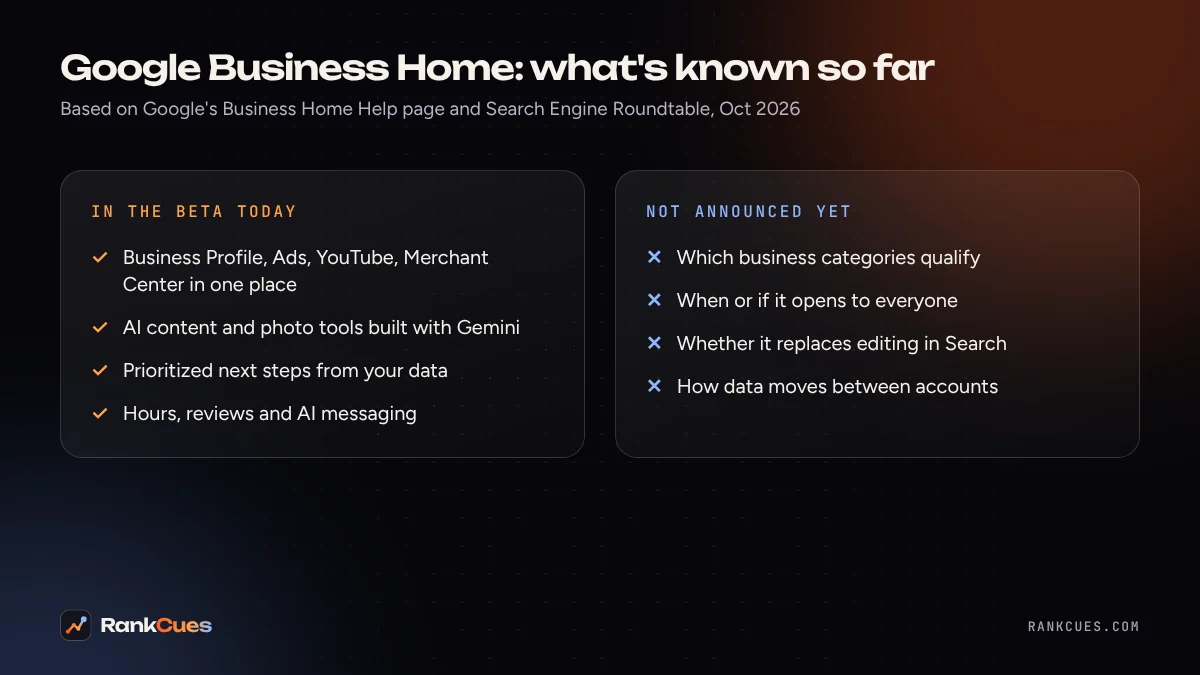
According to Google's help page, the beta has four main features today:
- Content creation. AI tools for writing posts and editing photos. Google says you keep full creative control.
- Location management. Update hours and respond to reviews without leaving the dashboard.
- Growth guidance. A prioritized list of next steps based on your business data.
- Customer messaging. AI-powered messaging using RCS for Business, the newer texting standard on many phones.
That last one ties into the AI messaging pilot we covered in our Google Business Profile messaging myths post. If that agent is answering your customers, it's answering from your profile. Same rule here.
Screenshots in SER's report show sections named Creative Lab, Posts, Reviews, Performance, Locations, Brand Kit and Connected tools. ALM Corp's write-up also mentions a future idea Google floated: spotting a sudden jump in demand and publishing a seasonal promo across channels. Treat that as a direction, not a feature you can use.
Who can get Google Business Home right now?
Not many businesses. Google's help page lists these requirements:
| Requirement | What Google's help page says |
|---|---|
| Location | Business based in the U.S. or U.K. |
| Category | Only "select business categories" (list not published) |
| Profile | Owner or manager of a verified Business Profile |
| Size | Fewer than 10 locations for the same business |
| Business type | One type of business only (not, say, a restaurant plus a retail shop) |
| Connected tools | One YouTube channel, one Google Ads account, one Merchant Center account |
| Policies | Must follow Google's policies, including those for connected tools |
Access comes by email. If you're picked, you'll get an invite with a "View your business home" button. Google also lists an entry page at business.google.com/create?flow_id=bh, but ALM Corp notes that signing up there doesn't guarantee you'll get in.
Google hasn't said when it'll open more widely, and neither source we read mentions a price.
 Photo by StartupStockPhotos on Pixabay
Does Google Business Home help your Google Maps ranking?
Nothing Google has published says so. Its local ranking help page still says local results are mainly based on relevance, distance and prominence, and that you can't pay for a better local ranking.
Think back to the filing cabinets. A tidier office doesn't change what's inside the folders. Your categories, services, reviews and photos still decide whether you show up in near me searches. If you haven't checked those lately, start with what your Google Business Profile categories actually do.
Where Business Home could help is time. An HVAC owner who answers reviews, posts a fall tune-up offer and checks ad spend in one place is more likely to actually do those things each week.
How should you prepare, invite or not?
The AI assistant can only work from what's in your accounts. So the prep is the same whether you get an invite next week or next year.
- Find every Google account. List who owns your Business Profile, Ads account, YouTube channel and Merchant Center. Google's help page says linking tools requires owner or manager access to each one, so an ex-employee holding ownership can block you.
- Get your profile verified and accurate. Business Home requires a verified profile. Check hours, services, phone number and holiday hours. Our free Google Business Profile checker flags common gaps.
- Clean up your Ads account. If you run Local Services Ads, they're moving into Google Ads anyway; our Local Services Ads migration guide covers that prep.
- Pick one YouTube channel. You can only connect one. If you have two half-used channels, decide which is the real one.
- Set your brand basics. Business Home has a Brand Kit area. Have your logo, colors and a short description of how you talk to customers ready, so AI drafts sound like you.
- Watch your inbox. Invites arrive by email. Make sure the email on your Business Profile is one someone actually reads.
Is Business Home worth signing up for?
If an invite lands, we'd try it. It's free to look, it's built on the accounts you already have, and you can unlink connected tools in Settings. Just read every AI-written post before it goes live, because Google's own guidance keeps the creative control with you.
If you don't get an invite, you're not missing a ranking boost. You're missing a nicer dashboard. The business owners who'll get the most from Business Home are the ones whose profiles, ads and reviews are already in good shape. Our Google Business Profile optimization service handles exactly that groundwork. Start with a free business audit and we'll show you what's missing across your Google accounts.
Sources
- Google Business Home Help: About the Business Home beta
- Search Engine Roundtable: Google Business Profiles New Business Home (Oct 22, 2026)
- ALM Corp: Google Tests Business Home, One Hub for Profiles, Ads and YouTube (Oct 27, 2026)
- Search Engine Roundtable: November 2026 Google Webmaster Report (Nov 2, 2026)
- Google Business Profile Help: Tips to improve your local ranking on Google
Frequently asked questions
What is Google Business Home?
It's a beta dashboard from Google that connects your Business Profile, Google Ads, YouTube and Merchant Center accounts in one place. Google's help page describes it as "a growth partner built with Gemini models" that gives insights and next steps across those tools.
Who can use Google Business Home?
Per Google's help page, it's a closed beta for select business categories in the U.S. and U.K. You need a verified Business Profile with fewer than 10 locations, you must manage only one type of business, and you must follow Google's policies. Google hasn't published the list of categories.
How do I get access to Google Business Home?
Eligible businesses get an invitation email with a "View your business home" button. Google's help page also lists business.google.com/create?flow_id=bh as an entry point, but signing up there doesn't guarantee access while the beta is closed.
Does Google Business Home replace my Business Profile?
No. Your Business Profile is one of the tools it connects. Google hasn't said whether Business Home will replace editing your profile directly in Search or Maps.
Will using Google Business Home improve my Google Maps ranking?
Google hasn't said so. Its local ranking help page says local results are mainly based on relevance, distance and prominence. Business Home is a management tool; what you put in your profile still does the work.