Google is moving Local Services Ads (LSA) into the main Google Ads platform as a Performance Max campaign built for pay-per-lead goals. You still pay per valid lead and still show only on Search and Maps, but manual bidding goes away, weekly budgets become daily, and old performance reports don't carry over. Download your reports now and review every setting after you move.
If you run Local Services Ads for a plumbing, HVAC, roofing, or cleaning business, Google is about to move your account, and your old performance reports won't come with it. Google's own help page says plainly: "Your Local Services Ads performance reports will not transition to Google Ads."
The Local Services Ads migration moves your campaigns out of the separate LSA dashboard and into the main Google Ads platform. Google started with a first group of U.S. advertisers in August 2026, and the next group, including service-area businesses with no storefront, is scheduled for late 2026. That's now. This guide walks through the six steps to take before and after your account moves.
What is changing with Local Services Ads?
Local Services Ads are the "Google Verified" ads at the top of some searches, like "emergency plumber near me." You pay when a customer calls, messages, or books, not when they click.
According to Google's help page, existing LSA campaigns are being moved automatically to a Performance Max campaign type built for pay-per-lead goals. (Performance Max is Google's automated campaign type; here it is a special version that keeps the pay-per-lead model.) Once you're moved, the old LSA dashboard redirects to Google Ads, and you manage budgets, targeting, and lead replies there.
Google's published timeline:
- August 2026: Select U.S. home and storefront service advertisers, such as plumbing, HVAC, and roofing.
- Late 2026: Service-area businesses without storefronts, and accounts with custom bidding or booking setups.
- 2027: Non-U.S. accounts and remaining categories.
What stays the same, and what doesn't?
The good news first: the basics of how you pay and where you show up don't change. The bigger changes are in how you control bids and budgets.
| Before (LSA dashboard) | After (Google Ads) | |
|---|---|---|
| How you pay | Per valid lead | Per valid lead (no change) |
| Where ads show | Google Search and Maps | Google Search and Maps (no change) |
| Keywords | None, based on service categories | None (no change) |
| Bidding | Manual max cost per lead, or Target CPA by industry or service | One campaign-level Target CPA; manual bidding removed |
| Budget | Average weekly budget | Average daily budget (weekly ÷ 7) |
| Monthly cap | Based on weekly budget | Daily average × 30.4 |
| Performance reports | In the LSA dashboard | Do not transfer |
| Lead history, call recordings | In the LSA dashboard | Transfer to Google Ads |
| BBB callout | Supported | Discontinued |
Source: Google Ads Help. Target CPA (cost per acquisition) is the average amount you tell Google you want to pay for each lead.
Search Engine Journal points out one open question: with a single Target CPA per campaign, it isn't yet clear how Google will handle services with very different lead costs, such as a drain cleaning call versus a full water heater replacement.
How do I prepare my LSA account? Six steps
1. Download your performance reports now
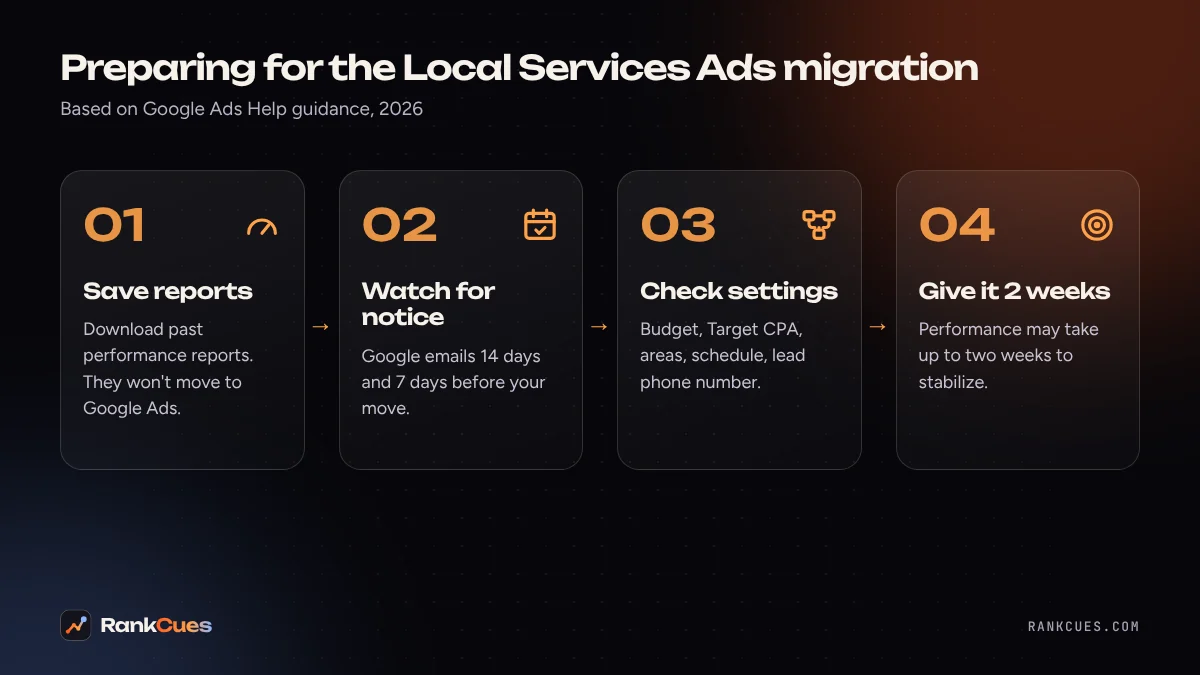
This is the one step you can't undo later. Google says you'll be able to download historical reports from the redirection page once it's available, and suggests screenshots if you need the data sooner. Save at least your lead volume, cost per lead, and spend by month and by service type. You'll want that baseline to judge whether the new campaign is doing better or worse.
2. Watch your inbox for the migration notice
Google sends an email 14 days before your migration and a reminder 7 days before, and shows banners in the LSA dashboard. Make sure the person who actually manages the account receives those emails, not an old staff address. If an agency runs your ads, ask them to confirm they've seen it.
3. Decide how you'll bid by service
Because the per-service Target CPAs are being merged into one, Google suggests creating separate campaigns if you need different bidding for different verticals. Think about which jobs are worth the most to you. A roofer may want replacement leads in their own campaign so a low-cost repair target doesn't hold them back.
Note that, for now, Google says you can't create new pay-per-lead campaigns inside Google Ads, so new campaigns still start at g.co/localservices.
4. Replace your BBB callout and tidy your Google Business Profile
Better Business Bureau callouts are being discontinued, and Google recommends adding at least six other structured callouts, such as "Licensed and insured" or "Same-day service," as long as they're true.
Your business name, address, and hours now come from your Google Business Profile and sync one way into Google Ads. Search Engine Journal reports that a significant name or address change can trigger a 24–48 hour verification review that pauses the campaign. So fix any profile errors before your migration, not during your busy week. Our free Google Business Profile checker can help you spot gaps.
5. Review every setting on your first login
After the move, check these one by one:
- Daily budget (your old weekly budget divided by 7)
- Target CPA
- Service types and business categories
- Service areas and ad schedule
- Lead phone routing number (this one you can edit directly in Google Ads)
- Lead email notifications, now on the Google Ads Notifications page; Google requires at least one active user to stay opted in
Google says targeted locations, service types, categories, budget limits, ad schedule, business photos, lead history, and your Google Verified badge should all migrate. Checking takes ten minutes and catches mistakes before they cost you a weekend of calls.
6. Give it two weeks before you judge it
Google says performance may take up to two weeks to ramp back to stable levels. Resist the urge to slash the budget on day three. Instead, make sure every lead is answered quickly: a missed call is still a lead you paid for. If calls go unanswered, our missed-call revenue calculator shows what that may be costing you.
Should I be worried about losing leads?
Not if you prepare. The pay-per-lead model, the Search and Maps placements, and the Google Verified badge all carry over. The real risks are practical: lost report history, a budget that converts oddly, a lead phone number that routes to the wrong line, or a profile change that pauses ads at the wrong moment. Each of those is avoidable with the steps above.
It's also a good moment to look at the bigger picture. With LSA now sitting next to your Search campaigns in one account, it's easier to compare what each lead source really costs.
Want a second pair of eyes before your account moves?
If you'd like someone to check your settings, your Google Business Profile, and your lead handling before and after the switch, our Google Ads management team can help. Start with a free business audit and we'll tell you what to fix first.
Sources
- Google Ads Help: Local Services Ads transition to Performance Max campaigns with pay-per-lead goals
- Search Engine Roundtable: Google Local Services Ads to transition to Google Ads platform (July 21, 2026)
- Search Engine Journal: Google is bringing Local Services Ads into Google Ads (July 20, 2026)
Frequently asked questions
Do I still pay per lead after the Local Services Ads migration?
Yes. Google's help page says the pay-per-lead model stays the same: you pay for valid leads such as calls, messages, and bookings, not for clicks.
Will I lose my Google Verified badge?
No. Google lists verification status and the Google Verified badge among the things that migrate, if your business already earned it.
When will my account move?
Google started with select U.S. home and storefront service advertisers in August 2026. Service-area businesses and accounts with custom bidding or booking setups follow in late 2026, and non-U.S. accounts in 2027. You get an email 14 days before your migration and a reminder 7 days before.
Can I create a new Local Services Ads campaign in Google Ads?
Not yet. Google says new pay-per-lead campaigns can't be created in Google Ads for now, so new campaigns still start at g.co/localservices.
Why did my leads drop right after the migration?
Google says performance may take up to two weeks to ramp back to stable levels. Check your budget, Target CPA, service areas, and lead phone number first, then give the campaign time before making big changes.
Keep reading
- Google's AI is calling local businesses for quotes. Will it reach yours?
- Google's official guide to AI search, explained for local businesses
- Google Business Profile changes in 2026: a checklist for local businesses
- AI receptionist vs answering service vs hiring staff: 2026 cost comparison
- What your Google Business Profile categories actually do
- Helping AI assistants describe your business accurately
- Five follow-up automations every service business can set up