Google is testing AI-powered Google Business Profile messaging in an early-access pilot. Customers message you from Search or Maps in their phone's texting app, an AI agent answers routine questions using your profile, and harder questions are passed to you. It isn't available to everyone yet, and Google hasn't said it affects ranking. A complete, accurate profile is the best prep.
Picture a customer on Google Maps at 9 p.m., asking your business "Do you do weekend appointments?" and getting a reply in seconds. You didn't type it. Google's AI did. It answered from whatever your profile says about your hours, which is fine if those hours are right and a real problem if they're from two summers ago.
That's the idea behind the new Google Business Profile messaging pilot. On October 29, 2026, Search Engine Roundtable reported that Google appears to be opening AI-powered messaging to more businesses. Owners are already trading rumors. Let's sort what's reported from what isn't.
What is Google's new AI messaging feature?
Based on Google's description quoted by SER, customers can message your business from Search and Maps using their phone's own texting app. An AI agent "will answer routine questions from customers, instantly and at no cost." Questions it can't handle are redirected to you, you can jump into any conversation, and all messages show up in your Business Profile.
Here's the simplest way to think about it. It's like hiring a host for your front door who has never met you. All they have is the clipboard you handed them: your hours, services, prices, and description. Right clipboard? Helpful host. If it's blank or out of date, they'll either guess or go get you, and you won't know which until a customer complains.
Myth 1: "Google just brought back the old chat button"
Truth: Nope. Google's help page on the old chat says chat was removed from Business Profiles on July 31, 2024. Back then, Google pointed eligible businesses to text messages or WhatsApp instead.
The new version is AI-first. SER's earlier June 26 report described a messaging area with a section labeled "Handled by your AI agent," plus Messages, Insights, Settings and Promote sections. That button appeared for a few hours and then disappeared.
Myth 2: "Every business can turn it on today"
Truth: Not yet. SER's October report says Google appears to be expanding it, and Barry Schwartz, who wrote it, said he didn't see it in his own account yet. Some owners got an email about an "AI-powered messaging pilot," and Mike Blumenthal's shared copy mentions help with reservations.
To check yours, Claudia Tomina's tip (quoted by SER) is to "Look for the red dot on Messages in your profile." A welcome screen lets you switch it on. No dot? Nothing to fix. You just don't have it yet.
Myth 3: "The AI already knows everything about my business"
Truth: It works from what you've given Google. Tomina put it bluntly: "The agent can only answer as well as your profile does." Google hasn't published a full list of what the agent reads, so treat your profile as the clipboard and assume nothing else is on it.
Suddenly the boring parts of your profile matter. A plumber with no services listed, or a salon with holiday hours missing, is handing the AI a half-empty clipboard.
Myth 4: "Turning on messaging will boost my Google Maps ranking"
Truth: Google hasn't said that, and we wouldn't bet on it. Its local ranking help page says local results are mainly based on relevance, distance and prominence, and it doesn't mention messaging at all. The same page says there's no way to request or pay for a better local ranking.
The practical upside is speed. Getting a correct answer at 9 p.m. instead of the next morning is good customer service, not a ranking trick. If ranking is your worry, your primary and secondary Google Business Profile categories matter far more for showing up in near me searches.
Myth 5: "The AI handles everything, so I can ignore my inbox"
Truth: The AI is the first responder, not the whole team. According to the early-access email SER quotes, "Your agent will redirect complex questions to you." Those tend to be the messages worth the most, like a custom quote or an emergency job.
So pick someone. Decide now who on your team watches the Business Profile inbox and how fast they'll reply, because a handed-off message that sits for two days is a lead you paid nothing for and still lost. If phones are already your bottleneck, compare options in our AI receptionist vs answering service cost breakdown. The same handoff problem applies to calls and texts.
Myth 6: "Every customer gets the same experience"
Truth: It depends on their phone, and plenty of customers will skip the AI entirely without knowing it exists. SER reports the full experience only works on phones and networks that support RCS (the newer, richer texting standard). Other customers' messages go straight to the business's phone as standard texts, and standard text rates may apply.
Those texts land on whatever number is on your profile. Does anyone read texts on that line? Check.
 Photo by niekverlaan on Pixabay
Myth vs truth at a glance
| Myth | What's actually reported |
|---|---|
| It's the old chat button back | Old chat ended July 31, 2024; the new one is AI-first |
| Everyone has it | Early-access pilot that appears to be expanding |
| The AI knows my business | It answers from your profile |
| It boosts my ranking | Google hasn't said so |
| I can ignore the inbox | Complex questions come to you |
| Every customer sees the AI | Only on RCS phones; others text your phone |
Sources: Search Engine Roundtable (Jun 26 and Oct 29, 2026), Google Business Profile Help.
How do I get my profile ready for Google Business Profile messaging?
AI messaging is also one of the features in Google's Business Home beta dashboard. Whether or not you have the pilot yet, these steps help the AI give right answers, and they help human visitors too.
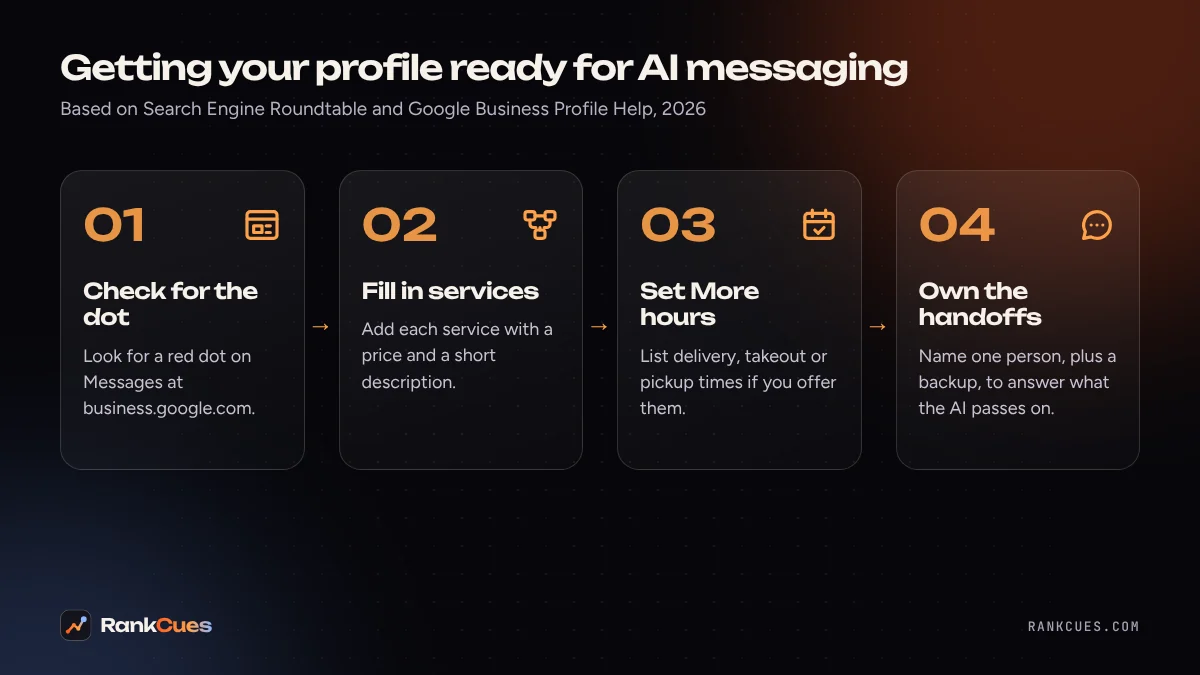
- Check for the Messages dot. Sign in at business.google.com and look for the red dot on Messages. No dot means no pilot yet; check again next week.
- Fill in your services. Google's services help page shows how to add suggested or custom services and edit each one to add a price and description. Don't put prices in custom service names; Google rejects those.
- Set More hours. Google's More hours let you list service-specific times like delivery, takeout or pickup, separate from your regular hours. If you take reservations, keep these accurate.
- Rewrite your description in customer language. Say who you serve, where, and what you don't do. Our guide on helping AI assistants describe your business accurately walks through this.
- Name an inbox owner. Pick one person to handle handed-off messages, plus a backup for weekends.
- Test it like a customer. Once it's live, message your own business from a friend's phone with three common questions and check the answers.
Not sure how complete your profile is? Our free Google Business Profile checker flags common gaps in a couple of minutes.
Should you turn it on?
If you get the invite, Google describes the agent's answers as coming "at no cost," and you can step in anytime. For most local businesses, it's worth a try. Just fix the clipboard first. An AI repeating wrong hours to customers is worse than no AI at all.
If you'd like a second pair of eyes, our Google Business Profile optimization team can review your profile before you switch it on. Start with a free business audit and we'll point out what to fix first.
Sources
- Search Engine Roundtable: Google Business Profiles AI-powered messaging expands (Oct 29, 2026)
- Search Engine Roundtable: Google Business Profiles message button briefly returns (Jun 26, 2026)
- Google Business Profile Help: Changes to Business Profile chat and call history
- Google Business Profile Help: Manage your services on your Business Profile
- Google Business Profile Help: How to set More hours
- Google Business Profile Help: Tips to improve your local ranking on Google
Frequently asked questions
Is Google Business Profile chat coming back?
Messaging is returning in a new form. Google removed the old chat feature on July 31, 2024, according to its help center. In late October 2026, Search Engine Roundtable reported that Google appears to be opening an AI-powered messaging pilot to more businesses.
Where does the AI agent get its answers?
From your Business Profile. Search Engine Roundtable quotes Claudia Tomina, who spotted the expanded rollout: "The agent can only answer as well as your profile does." Google hasn't published full documentation on its data sources yet.
How do I know if I have the AI messaging feature?
Per Search Engine Roundtable's October 29, 2026 report, look for a red dot on Messages in your Business Profile. A welcome screen lets you turn the feature on. Some owners also received early-access emails.
Does turning on messaging help my Google Maps ranking?
Google hasn't said so. Its help page says local results are mainly based on relevance, distance and prominence, and the page doesn't mention messaging. The clearer benefit is answering customers faster.
What happens if a customer's phone doesn't support RCS?
Search Engine Roundtable reports those messages go straight to the business's phone as standard texts, and standard text rates may apply.