Google Ads match types tell Google how closely a search has to fit your keyword before your ad can show. Exact match [keyword] is the tightest, phrase match "keyword" covers searches that include its meaning, and broad match (the default) covers related searches too. Local businesses should check the search terms report weekly and add negative keywords for jobs they don't do.
Type "water heater repair" into Google Ads with no punctuation around it and you've just told Google to show your ad on searches related to water heater repair, not only that phrase. That's broad match, and it's the default. Plenty of local business owners never find out, because the setting is decided by a pair of quotation marks or brackets they didn't type.
Google Ads match types for local businesses decide which searches can trigger your ads, and so where your budget goes. This week Google changed how match types show up in reporting and how Performance Max treats brand searches. Here's a plain-English explanation of what each match type does, what changed, and what to check in your own account.
What are Google Ads match types, in plain English?
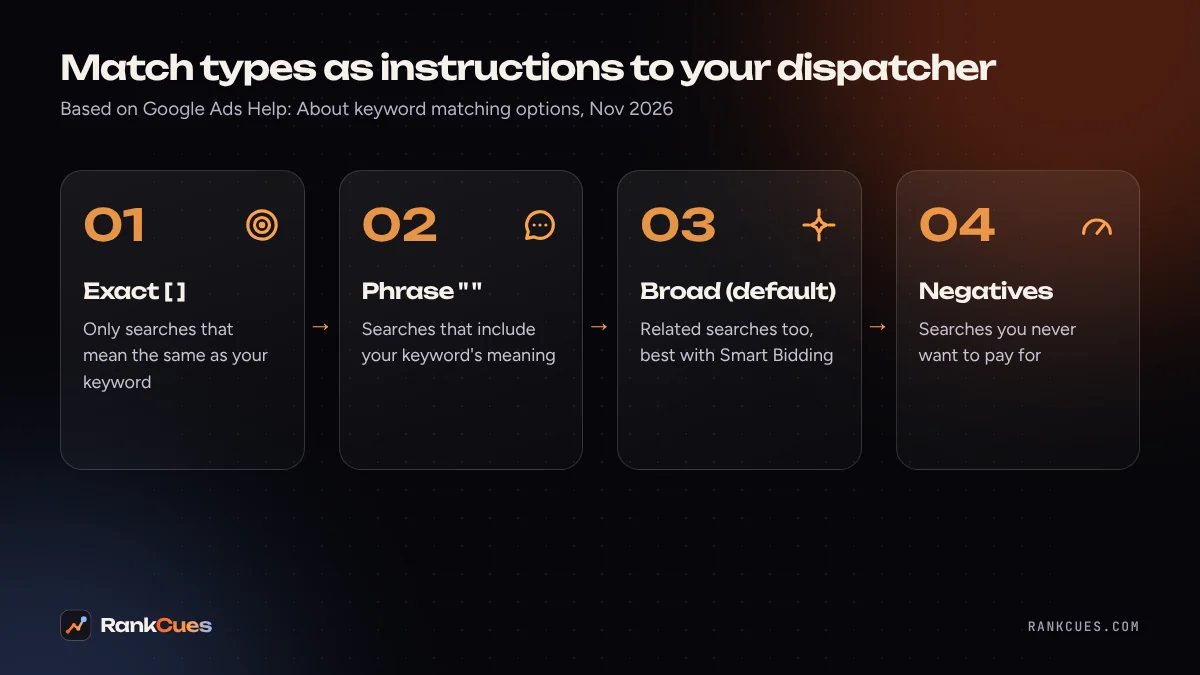
Think of your keywords as instructions to a new dispatcher who answers your phones.
- Exact match is "only book jobs that mean exactly this." You write it in square brackets:
[water heater repair]. - Phrase match is "book jobs that include this service." You write it in quotation marks:
"water heater repair". - Broad match is "book anything you think is related." You write the words on their own:
water heater repair. - Negative keywords are "never book these," for work you don't do or searchers you don't want.
The dispatcher's smart. Even exact match isn't word for word. Google's help page on keyword matching options says exact match ads "may show on searches that have the same meaning or same intent as the keyword." Phrase match ads may show on "searches that include the meaning of your keyword." Broad match goes further and can include searches related to the keyword that don't share its direct meaning.
How do the three match types compare?
Here's one keyword at each setting. The example searches are illustrations of the kind of query each type is designed to reach, not data from a real account.
| Match type | How you write it | Reach | Control | Searches it could reach (illustration) |
|---|---|---|---|---|
| Exact | [water heater repair] |
Smallest | Most | water heater repair, repair water heater |
| Phrase | "water heater repair" |
Medium | Medium | water heater repair near me, emergency water heater repair Tuesday |
| Broad (default) | water heater repair |
Largest | Least | water heater leaking, tankless water heater install |
The broad row is where local budgets leak. Fast. If you only repair water heaters and don't install them, an install search is a click you pay for and can't turn into a job. On the other hand, broad match can find real customers who describe their problem in words you'd never think to bid on, like "no hot water in shower."
Google's help page says broad match is critical to use with Smart Bidding (bidding that adjusts for each auction based on signals like device and location). We agree when your conversion tracking is solid, because the system learns which related searches turn into calls. If you aren't tracking calls and form fills yet? Broad match is working half blind.
What changed in Google Ads this week?
Three updates landed on November 3 and 4, 2026. None of them is huge on its own, but together they're a good reason to open your account this week.
1. Two "search terms match type" fields. Search Engine Roundtable reported on November 4 that Google Ads now shows two similar fields. Ginny Marvin, Google's Ads Liaison, explained that "Search terms match type (Keywords)" is the older field, renamed, and maps to the Keywords tab. The newer "Search terms match type" maps to the Search terms tab and, according to the advertiser who first spotted it, also covers AI Max and other campaign types. One catch for now: the "Search term" column must be in your Report Editor report for the newer field to return every match type. Google says a fix is in progress.
2. Performance Max may skip brand searches. Google updated its help document on how Performance Max works alongside other campaigns. As Search Engine Roundtable covered, it now says Performance Max "may also filter out navigational or brand-specific search queries" so dedicated Search campaigns can handle them. Google advises keeping brand Search campaigns funded with "sufficient budget and high-quality, eligible ads."
3. Asset scheduling by weekdays or weekends. Advertisers can now group days when scheduling ad assets, for example showing a "Same-day weekend service" callout only on Saturday and Sunday. This was reported by Search Engine Roundtable from an advertiser's LinkedIn post, not an official Google announcement.
For most local businesses, update 2 is the one to act on. If someone searches your company name and you've been counting on Performance Max to catch it, check that a Search campaign with your brand name as a keyword is there to pick it up.
Where does AI Max fit in?
AI Max for Search campaigns is an optional set of features that sits on top of your keywords. Google's AI Max help page lists "improved search term matching," text customization of your headlines and descriptions, and final URL expansion, which can send people to a page on your site that better fits their search.
In dispatcher terms, AI Max lets the dispatcher take calls you didn't list and rewrite your script a little for each caller. It can find extra jobs. But you'll only see what it did in the search terms report, so the new reporting field isn't a small thing.
 Photo by raman1100 on Pixabay
How should a local business check its match types? A 7-step checklist
You can do this once a week. Or have whoever runs your ads walk you through it while you watch.
- Find your broad match keywords. Open the Keywords tab and add the Match type column. Anything without brackets or quotes is broad.
- Open the search terms report. Google's search terms report help page describes it as the list of real searches that triggered your ads. Sort by cost.
- Read the Match type column. It shows how each search was matched to your keyword, which can be different from the match type you chose.
- Add negatives for jobs you don't do. "Install," "jobs," "salary," "DIY," a city you don't serve, or a service you've stopped offering are common candidates. Google notes that some low-volume searches are left out of the report for privacy, so you won't see everything.
- Add the new field to a report. In Report Editor, include both "Search term" and "Search terms match type" so AI Max matches show up too.
- Check your brand campaign. Search your own business name. If Performance Max was catching those searches, a Search campaign may need to take over.
- Match your schedules to your hours. If you only answer the phone on weekdays, line up your ad schedule and any asset schedules with that. Paying for a weekend call that goes to voicemail is the expensive version of a missed call.
On that last point, our missed-call revenue calculator shows roughly what unanswered calls cost you per month, using your own numbers.
Which match type should you start with?
It depends on your budget and your tracking. A plumber with $1,500 a month and no call tracking has different needs from a multi-location HVAC company with years of conversion data.
What we'd usually suggest as a cautious start is phrase and exact match on your core services, a solid negative keyword list, and conversion tracking for calls and forms. Once the account is reliably recording leads, testing broad match with Smart Bidding on one campaign lets you compare. Whichever way you go, the search terms report is how you find out whether your dispatcher is booking the right jobs.
If your ads also run alongside Local Services Ads, read our guide on preparing for the Local Services Ads move into Google Ads, since those campaigns now live in the same account. And when the ads work and the phone rings, the next leak is the follow-up: our post on five follow-up automations for service businesses covers what to send after the first call.
Want a second pair of eyes on your ads?
If you'd like someone to look through your keywords, search terms and brand campaign setup, our Google Ads management team can review it. Start with a free business audit and we'll tell you what we'd change and why. We can't promise a specific number of leads, but we can show you where your budget is going.
Sources
- Google Ads Help: About keyword matching options
- Google Ads Help: About the search terms report
- Google Ads Help: Optimize Google Ads with AI Max for Search campaigns
- Search Engine Roundtable: Google Ads explains difference with search terms match type (Nov 4, 2026)
- Search Engine Roundtable: Google Ads PMax campaigns may filter out navigational and brand queries (Nov 3, 2026)
- Search Engine Roundtable: Google Ads asset scheduling with day grouping (Nov 3, 2026)
Frequently asked questions
Which Google Ads match type is best for a small local business?
There's no single best one. Exact and phrase match give you more control over which searches trigger your ads. Google says broad match works best with Smart Bidding, because the bidding system uses signals to decide which related searches are worth paying for. Many small accounts start tighter and widen once they trust their conversion tracking.
What is the default match type in Google Ads?
Broad match. Google's help page lists broad match as the default, so if you type a keyword with no quotation marks or brackets, it's broad.
Why did my ad show for a search that doesn't contain my keyword?
Phrase and exact match work on meaning, not exact wording, and broad match also covers related searches. The search terms report shows the actual searches that triggered your ads, and its Match type column shows how each search was matched.
What changed in Google Ads reporting in November 2026?
Google Ads now has two similar fields. "Search terms match type (Keywords)" is the older one and covers legacy match types in Search campaigns. "Search terms match type" is newer and also covers AI Max and other campaign types. For now, the Search term column must be in your Report Editor report for the newer field to return every match type.
Do match types matter if I also run Performance Max?
Yes. Google's help pages say exact match keywords that are identical to the search term get priority over Performance Max. Google also updated its documentation in November 2026 to say Performance Max may filter out brand and navigational searches so dedicated Search campaigns can serve them.